


Brazil is one of the countries with the fastest-growing Venezuelan communities in Latin America, and many of these families send money to Venezuela to cover household expenses, support their parents, or help with emergencies. If you live in Brazil and are looking for a fast, secure way to do so without hidden fees, this guide explains step-by-step how to send money from Brazil with Retorna.
What do you need to send money from Brazil with Retorna?
To register and send money from Brazil with Retorna, you need:
- A valid identity document: Identity Card (RG), Digital Identity Card (RG Digital), National Migration Registry Card (CRNM) for legal foreign residents, Regional Council Card, Military Identity Card, and National Foreigner Registry
- Recipient details: Full name and account details or collection method in the destination country
- Payment method: From Brazil, payment is made exclusively via PIX, the Central Bank of Brazil's instant transfer system, available 24/7, including weekends and holidays
💡 Tip: You cannot register with expired documents or temporary protocols, and we do not accept CPF for identity verification. All documents must be valid, legible, include a photo of the holder, and show no visible alterations.
Suggestion:
💡 Tip: You cannot register with expired documents, temporary protocols, or only a CPF to verify your identity. All documents must be valid, be legible, include the cardholder's photo and show no visible signs of tampering.
How to send money from Brazil with Retorna: step-by-step
Step 1: Open the app and start your transfer
Log in to the Retorna app and select "Start your transfer".
💡 Tip: If it's your first time, you must first register with your RG, Digital RG, or CRNM. Registration is free and takes less than two minutes. Please note that in Brazil, Retorna is only available as a mobile app (iOS and Android) — there is no web version for this country of origin.
Step 2: Enter the amount
Enter the amount you wish to send or the amount you want your recipient to receive. The app will automatically calculate the corresponding value based on the current exchange rate.
Step 3: Select the delivery method
Choose how you would like your recipient to receive the money. The available options will depend on the country you are sending to.
Step 4: Choose your recipient
Select a saved recipient or add a new one by entering their full details.
Step 5: State the reason for the transfer
Select the reason for the transfer (family support, food, emergencies, among others). This information is required to process your transaction correctly.
Step 6: Review the transfer summary
Before confirming, verify all the information: amount to pay, recipient, delivery method, exchange rate, and fee.
Step 7: Make the payment with PIX
The app will show you two ways to pay:
- QR Code: scan it directly from your banking app.
- PIX Copy and Paste: copy the code and paste it into the PIX section of your banking app.
Log in to your banking app, select PIX, scan the QR code or paste the copied code, and authorize the payment.
💡 Tip: the payment must be made from a bank account in your own name, which must match the account holder registered on your Retorna account exactly — you cannot pay from your spouse's account or anyone else's. PIX is free between individuals at most Brazilian banks, so you won't pay any extra fees for using it.
All set!
Once your PIX payment is authorized, Retorna will process your transfer so your recipient receives the money quickly and securely.
Which countries can you send money to from Brazil with Retorna?
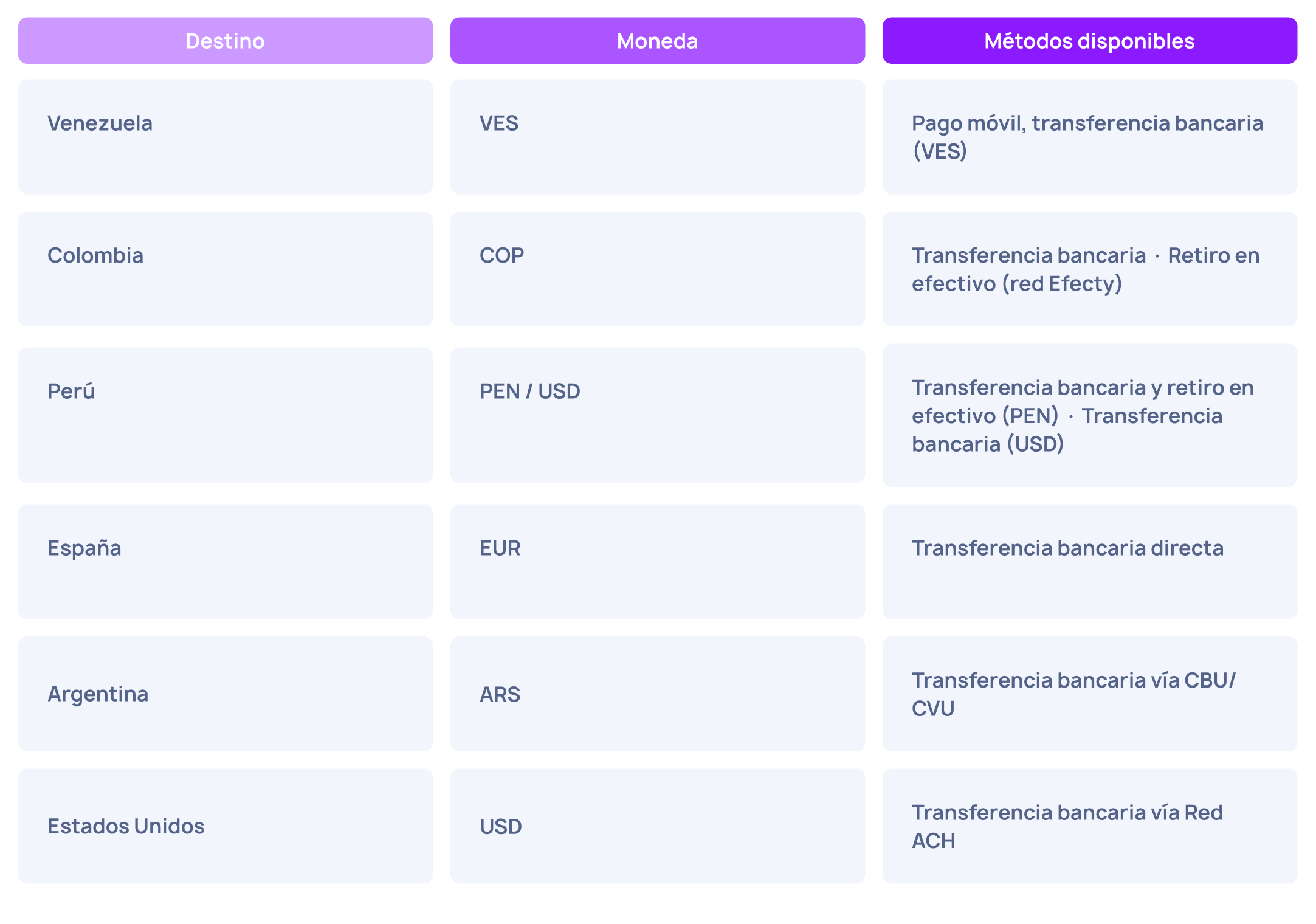
Currently, you can send money from Brazil with Retorna to Venezuela, Colombia, Peru, Spain, Argentina, and the United States. Brazil is only enabled as a sending country — you cannot receive money in Brazil with Retorna.
One of our main corridors is Brazil → Venezuela, as it is designed to facilitate money transfers for the Venezuelan community living in the country. Transfers to Venezuela are made in Venezuelan bolivars (VES) via mobile payment or bank transfer.
How long does it take to send money from Brazil to Venezuela?
Sending money from Brazil to Venezuela with Retorna is fast and transparent. Remember to check the rate before confirming, and your family will receive the money in minutes. If you have loved ones in Venezuela, you already have everything you need to make your first transfer.
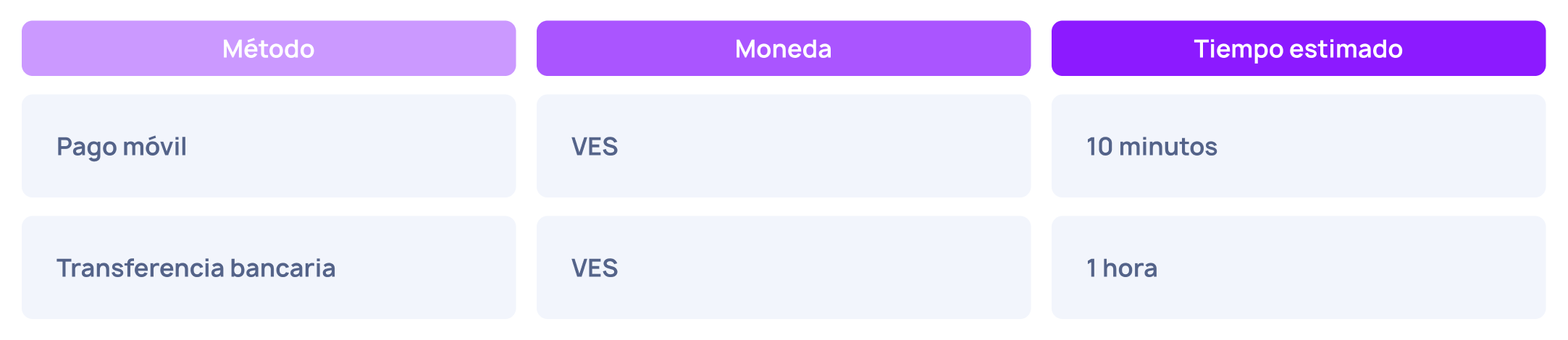
Transfers to Venezuela are usually processed in a few minutes or hours, depending on the selected delivery method.
For transfers to Colombia, Peru, Spain, Argentina, and the United States, delivery times may vary depending on the bank or delivery method selected in the destination country, ranging from minutes for digital methods to business days for traditional bank transfers. The countdown begins once Retorna validates your payment.
Internal link building
Want to see all the countries from which you can send and receive money with Retorna? Read this article: Countries from which you can send and receive money with Retorna – updated guide
Do you have questions about the payment methods available in your country? Check out: Payment methods on Retorna by country: what options you have and how to use them easily
Frequently Asked Questions (SEO FAQ)
Can I send money from Brazil to Venezuela with Retorna?
Yes. You can send in Venezuelan bolivars (VES) via mobile payment or bank transfer. Sending in US dollars (USD) is not available.
What documents do I need to register with Retorna from Brazil?
Identity Card (RG), Digital RG, National Migration Registry Card (CRNM) for foreigners with legal residency, Regional Council Card, Military Identity Card, and National Foreigner Registry. Expired documents or temporary receipts are not accepted.
What payment method can I use to send money from Brazil?
From Brazil, the only available payment method is PIX, via QR code or "PIX copy and paste," at no additional cost. The payment must be made from a Brazilian bank account in your own name.
What are the limits for sending money from Brazil?
The daily limit is 10,200 BRL, the weekly limit is 25,500 BRL, and the monthly limit is 48,450 BRL (where applicable). Each transfer to Venezuela in bolivars can be made in amounts from 15 to 2,400 BRL per transaction.
How long does it take for money to arrive from Brazil to Venezuela?
Mobile payments in VES take about 10 minutes, and bank transfers in VES take around 1 hour.
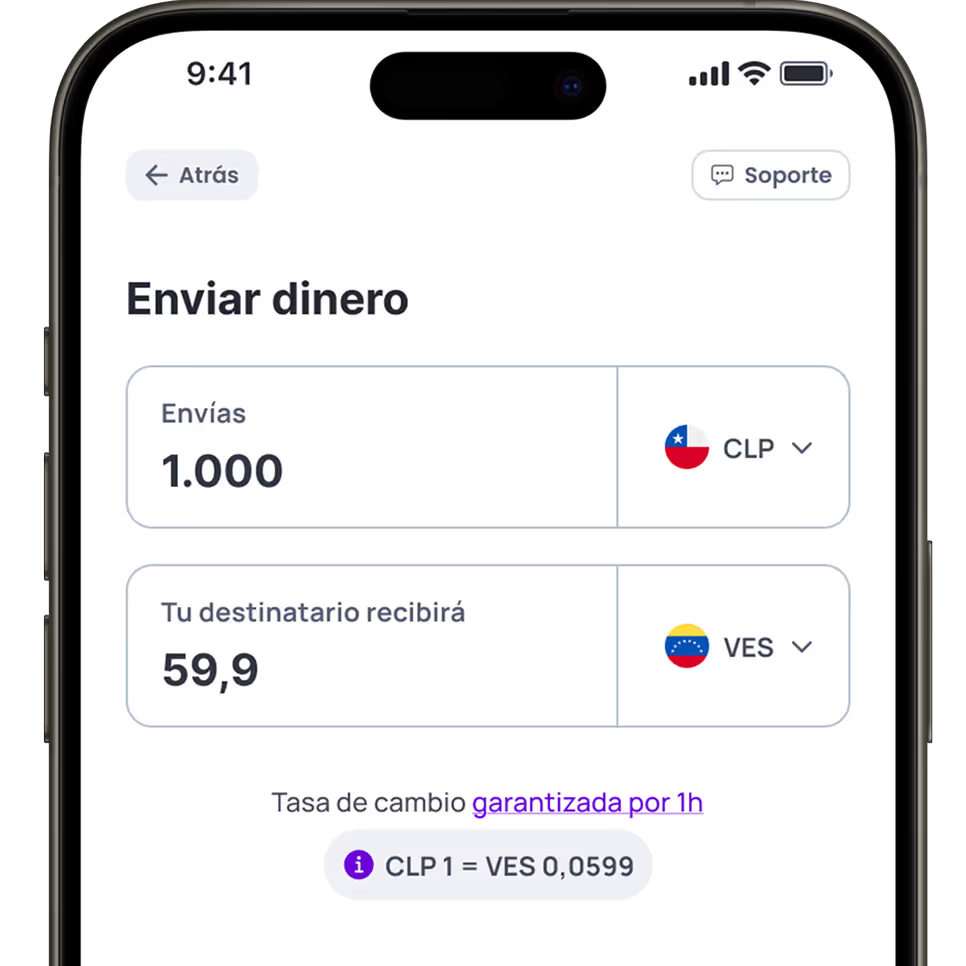

Your money arrives in a heartbeat
With Retorna, your transfers arrive in minutes. It's as easy as sending a WhatsApp message. Send money in just a few clicks—fast, secure, and hassle-free.